

romes_cyc が 2024年05月04日10時51分14秒 に編集
コメント無し
本文の変更
# つくるもの 4つのフルカラーLEDで時刻を表示してくれます 普通の時計に比べたメリット - 部屋の電気が消えていても見やすい - 暗くて視力が悪くても色は見えるので,夜中の時刻を知りたいときに便利 - 抵抗カラーコードを覚える練習にもなる 抵抗カラーコード表 | 数字 | 色 | |:---:|:---| | 0 | 黒 | | 1 | 茶 | | 2 | 赤 | | 3 | 橙 | | 4 | 黄 | | 5 | 緑 | | 6 | 青 | | 7 | 紫 | | 8 | 灰 | | 9 | 白 | # 回路 ## 使用する部品
- ESP32 dev board:https://amzn.to/2O2XFah - WS2812B 4つ:https://amzn.to/37UBwSq
- ESP32 dev board:https://amzn.to/3whqh6f - WS2812B 4つ:https://amzn.to/3UHAzG6
- 抵抗 470Ω - 適当な線材(ユニバーサル基板,UEWなど) 今回はESP32とWS2812B を用いて製作しています. マイコンのボードはたくさん種類がありますが,その中でもESP32,WROOM02,M5 StackなどはWi-Fiを介してインターネットに手軽に接続することができます. インターネットに接続できるとインターネット経由で時刻を取得できるのが大きなメリットです.時刻を自動的に調整する方法としては電波時計の電波を使う方法,GPSを取得する方法,FMラジオもありますが,これらの電波は自宅内では入りづらいことがあります.自宅での利用を考えると,一番安定して同期できる方法がインターネットを経由する方法になりました.(専用モジュールを買わなくてもいいので安価に製作できるメリットもあります) フルカラーLEDにWS2812B を利用した理由は配線が少なく,手軽に扱えるためです.普通のフルカラーLEDはLEDから赤,青,緑,GNDの四本がでていて,それぞれのピンにPWM信号を加えて光らせます.今回の時計は時間2桁と分2桁の4桁分で4つのLEDを使用します.となると,12本のPWM出力と配線が必要になります.ESP32は12本のPWM出力があるので大丈夫ですが,12本の配線は大変です.そこで,プラスマイナスの電源と信号線の1本だけで点灯できるWS2812B を使用しました.信号線で信号を送ることでそれぞれのLEDを個別に1670万色に光らせることができます(R,G,Bそれぞれ255段階で調整可能). また,WS2812B を採用することによってM5 Stickでも動かすことができるかもしれないメリットもあります.(まだ持っていないので検証していないです) ## 配線 配線はESP32とLEDテープの間を5V,GND,信号線を接続するだけです.信号線の間には470Ωの抵抗を挿入しています. | EPS32 | LEDテープ| |:---:|:---| | Vin | +5V | | 11 | DI | | GND | GND | 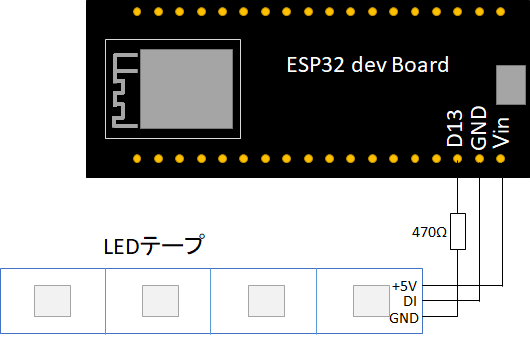 ## ユニバーサル基板への実装 ユニバーサル基板にはんだ付けして取り付けました. 抵抗は2012Mのチップ抵抗を使ってLEDと同じ面に取り付けています.(写真の赤矢印のところ) 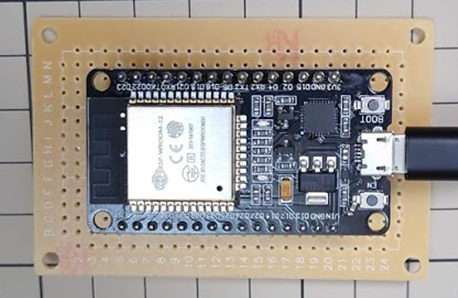 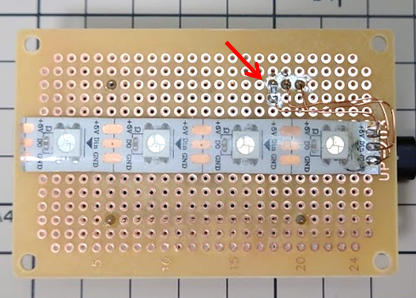 # 利用方法 Adafruit NeoPixcelのライブラリをインストールします.https://github.com/adafruit/Adafruit_NeoPixel ESP32の開発環境を構築します.https://rikoubou.hatenablog.com/entry/2019/06/19/161443 ソースコードの頭にあるSSIDとPWを入力します. あとは,インターネットから時刻を取得してLEDが点灯します. # プログラム ソースコードはNTPサーバから時刻を取得するプログラム,毎秒カウントするプログラム,LEDテープを制御するプログラムから構成されます.NTPサーバから時刻を取得する部分はArduinoのサンプルプログラムをもとに製作しました. コードは長いので最後に記述します. ## 初期化:void setup() 1. Wi-Fiまわりの初期化 1. NTPサーバから時刻を取得 1. 割り込み処理を実行(1秒に一回TimerCounter()を実行して,1秒毎に時間をインクリメントします) 1. NeoPixcelの初期化 ## 毎秒の処理:void TimerCounter() 1. 時刻をインクリメント 1. LEDを表示する関数を実行 ## 1時間ごとの処理:メインループ内のif(epoch%3600 == 0) getNTP(); 1. NTPサーバから時刻を取得(内部のカウンターでは時刻にずれが生じるため定期的に同期させる.毎秒NTPサーバから時刻を取得するとDoS攻撃とみなされる恐れがあるため,1時間に一回にしています) ## LEDの点灯処理:void time2led(int hour, int minute){ 1. 明るさの定義(抵抗のカラーコードになるようにRGBのバランスと強さを定義します) 1. 時分はそれぞれ2桁で表されるので4つの数字に分割 1. Neopixcelを消去 1. それぞれの時間に対応するようにNeoPixcelを光らせる 1. NeoPixcelにデータ送信 # 動作確認・動作例 USBケーブルを電源に接続するとWi-Fiに接続し,NTPサーバから時刻を取得したあと点灯します. もし,点灯しない場合はESP32をPCに接続し,Arduinoのシリアル通信を使うことで原因の切り分けができます.よくあるのが,Wi-FiのSSID,Passwordを間違えていた,ルータでNTPサーバへのアクセスをブロックしていた,LEDを接続するポートがミスっていたなどです.もし,Wi-Fiの調子が悪いならテザリングを使ってみるといいかもしれません. 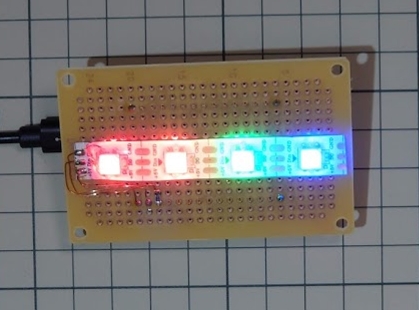 # ソースコード ソースコードはGitHubからもダウンロードできます. ```arduino:コード /* Udp NTP Client Get the time from a Network Time Protocol (NTP) time server Demonstrates use of UDP sendPacket and ReceivePacket For more on NTP time servers and the messages needed to communicate with them, see http://en.wikipedia.org/wiki/Network_Time_Protocol created 4 Sep 2010 by Michael Margolis modified 9 Apr 2012 by Tom Igoe updated for the ESP8266 12 Apr 2015 by Ivan Grokhotkov This code is in the public domain. */ #include <WiFi.h> #include <WiFiUdp.h> #include <Ticker.h> #include <Adafruit_NeoPixel.h> char ssid[] = "SSID"; // your network SSID (name) char pass[] = "passpass"; // your network password unsigned long epoch=0; unsigned int localPort = 2390; // local port to listen for UDP packets /* Don't hardwire the IP address or we won't get the benefits of the pool. * Lookup the IP address for the host name instead */ //IPAddress timeServer(129, 6, 15, 28); // time.nist.gov NTP server IPAddress timeServerIP; // time.nist.gov NTP server address const char* ntpServerName = "time.nist.gov"; const int NTP_PACKET_SIZE = 48; // NTP time stamp is in the first 48 bytes of the message byte packetBuffer[ NTP_PACKET_SIZE]; //buffer to hold incoming and outgoing packets // A UDP instance to let us send and receive packets over UDP WiFiUDP udp; Ticker ticker; int alarm_hour = 0 ; int alarm_min = 0; // LED init #define pinPixels 13 // pin number of LED #define numPixels 4 // number of neopixcel LEDs Adafruit_NeoPixel pixels(numPixels, pinPixels, NEO_GRB + NEO_KHZ800); void time2led(int hour, int minute){ int colorCode[10][3] = {{0,0,0}, // 0 Black {175,25,0}, // 1 Brown {255,0,0}, // 2 Red {225,25,0}, // 3 Orange {225,100,0}, // 4 Yellow {0,255,0}, // 5 Green {0,0,255}, // 6 Blue {125,0,125}, // 7 Purple {10,10,10}, // 8 Gray {255,255,255}, // 9 white }; int timedigit[4] ={0,0,0,0}; Serial.print("hour:"); Serial.print(hour); Serial.print("minute:"); Serial.println(minute); timedigit[0] = (hour/10)%10; timedigit[1] = hour%10; timedigit[2] = (minute/10)%10; timedigit[3] = minute%10; pixels.clear(); for(int i=0;i<4;i++){ int j = timedigit[i]; Serial.print("j:"); Serial.print(j); Serial.print(", i:"); Serial.println(i); pixels.setPixelColor(i,pixels.Color(colorCode[j][0],colorCode[j][1],colorCode[j][2])); } pixels.show(); } void TimerCounter() { // 1秒ごとに実行される.1秒毎に時刻をインクリメントする. epoch ++; Serial.write("UnixTime:"); Serial.println(epoch); //Serial.println((epoch+32400)%86400); // print the hour, minute and second: Serial.print("The JST time is "); // UTC is the time at Greenwich Meridian (GMT) Serial.print(((epoch % 86400L) / 3600 +9)%24); // print the hour (86400 equals secs per day) Serial.print(':'); if ( ((epoch % 3600) / 60) < 10 ) { // In the first 10 minutes of each hour, we'll want a leading '0' Serial.print('0'); } Serial.print((epoch % 3600) / 60); // print the minute (3600 equals secs per minute) Serial.print(':'); if ( (epoch % 60) < 10 ) { // In the first 10 seconds of each minute, we'll want a leading '0' Serial.print('0'); } Serial.println(epoch % 60); // print the second int hour = ((epoch % 86400L) / 3600 +9)%24; // JSTにするために+9時間している int minute = (epoch % 3600) / 60; time2led(hour, minute); } void setup() { Serial.begin(115200); Serial.println(); Serial.println(); pinMode(0,INPUT); pinMode(16,OUTPUT); pinMode(4,OUTPUT); pinMode(5,OUTPUT); digitalWrite(16,LOW); digitalWrite(4,LOW); digitalWrite(5,LOW); // We start by connecting to a WiFi network Serial.print("Connecting to "); Serial.println(ssid); WiFi.begin(ssid, pass); while (WiFi.status() != WL_CONNECTED) { delay(500); Serial.print("."); } Serial.println(""); Serial.println("WiFi connected"); Serial.println("IP address: "); Serial.println(WiFi.localIP()); Serial.println("Starting UDP"); udp.begin(localPort); getNTP(); ticker.attach(1, TimerCounter); pixels.begin(); } void loop() { if(epoch%3600 == 0) getNTP(); delay(1000); } // send an NTP request to the time server at the given address unsigned long sendNTPpacket(IPAddress& address) { Serial.println("sending NTP packet..."); // set all bytes in the buffer to 0 memset(packetBuffer, 0, NTP_PACKET_SIZE); // Initialize values needed to form NTP request // (see URL above for details on the packets) packetBuffer[0] = 0b11100011; // LI, Version, Mode packetBuffer[1] = 0; // Stratum, or type of clock packetBuffer[2] = 6; // Polling Interval packetBuffer[3] = 0xEC; // Peer Clock Precision // 8 bytes of zero for Root Delay & Root Dispersion packetBuffer[12] = 49; packetBuffer[13] = 0x4E; packetBuffer[14] = 49; packetBuffer[15] = 52; // all NTP fields have been given values, now // you can send a packet requesting a timestamp: udp.beginPacket(address, 123); //NTP requests are to port 123 udp.write(packetBuffer, NTP_PACKET_SIZE); udp.endPacket(); } void getNTP(){ //get a random server from the pool WiFi.hostByName(ntpServerName, timeServerIP); sendNTPpacket(timeServerIP); // send an NTP packet to a time server // wait to see if a reply is available delay(1000); int cb = udp.parsePacket(); if (!cb) { Serial.println("no packet yet"); } else { Serial.print("packet received, length="); Serial.println(cb); // We've received a packet, read the data from it udp.read(packetBuffer, NTP_PACKET_SIZE); // read the packet into the buffer //the timestamp starts at byte 40 of the received packet and is four bytes, // or two words, long. First, esxtract the two words: unsigned long highWord = word(packetBuffer[40], packetBuffer[41]); unsigned long lowWord = word(packetBuffer[42], packetBuffer[43]); // combine the four bytes (two words) into a long integer // this is NTP time (seconds since Jan 1 1900): unsigned long secsSince1900 = highWord << 16 | lowWord; Serial.print("Seconds since Jan 1 1900 = " ); Serial.println(secsSince1900); // now convert NTP time into everyday time: Serial.print("Unix time = "); // Unix time starts on Jan 1 1970. In seconds, that's 2208988800: const unsigned long seventyYears = 2208988800UL; // subtract seventy years: epoch = secsSince1900 - seventyYears; // print Unix time: Serial.println(epoch); // print the hour, minute and second: Serial.print("The UTC time is "); // UTC is the time at Greenwich Meridian (GMT) Serial.print((epoch % 86400L) / 3600); // print the hour (86400 equals secs per day) Serial.print(':'); if ( ((epoch % 3600) / 60) < 10 ) { // In the first 10 minutes of each hour, we'll want a leading '0' Serial.print('0'); } Serial.print((epoch % 3600) / 60); // print the minute (3600 equals secs per minute) Serial.print(':'); if ( (epoch % 60) < 10 ) { // In the first 10 seconds of each minute, we'll want a leading '0' Serial.print('0'); } Serial.println(epoch % 60); // print the second } // wait ten seconds before asking for the time again delay(10000); } ```